Skip to content
English - Canada
  • There are no suggestions because the search field is empty.

Manage your review group

Manage your review group by going through the following steps:

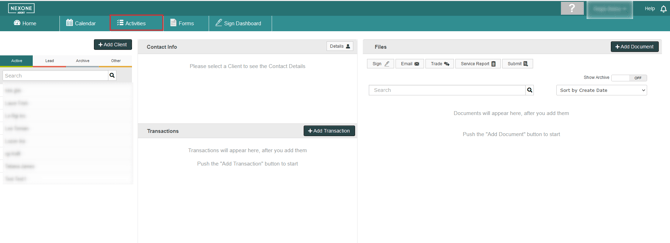
  1. Click the Activities Tab

    de85b383-1400-4a7e-95f4-92c7ec75d0f2 


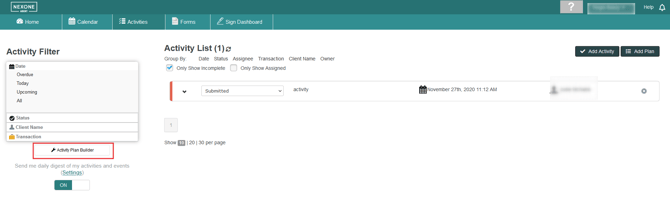
  2. Click the Activity Plan Builder

     fa7f16cd-ca15-4755-8b22-41f23121c740


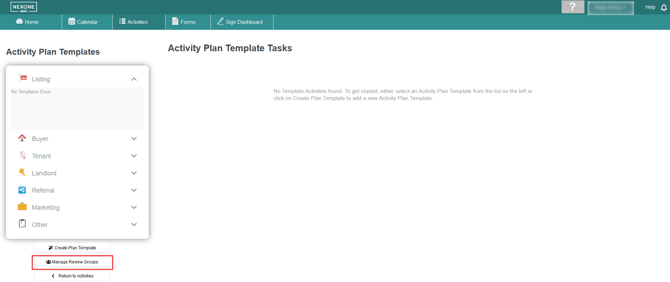
  3. Click Manage Review Groups

     79de00c1-bafd-4efe-b4f2-28ca41ae7c7c


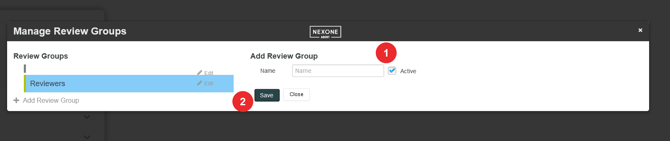
  4. Click Add Review Group

     3e0a46b0-32f3-465e-b8d0-b22cd4e4e687


  5. Enter the title for your review group, then hit Save
    ec924986-bc83-422b-81b6-9de12436c6ec 


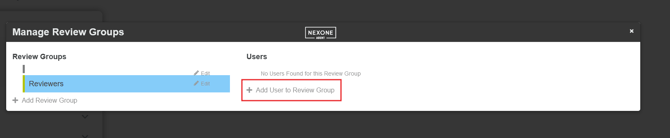
  6. Select a review group and click Add User to Review Group
    608325a4-dcc7-4939-846c-9d13b06a41cb 
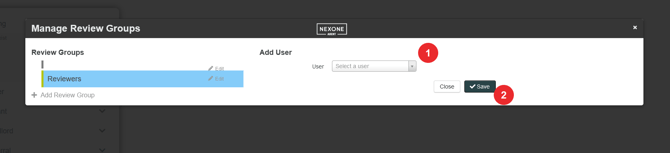
  7. Select a user from the drop down list, then hit Save
     350d5447-6de2-4e61-aab8-2a23d2c0b979


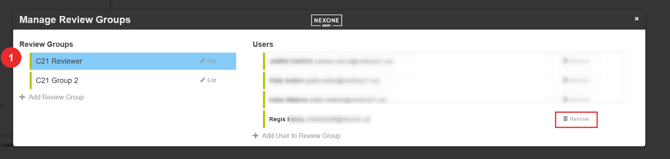
  8. Select the review group and click on remove to remove a reviewer
     aa57cacb-e26c-4e08-9932-c87fa2bec8b8


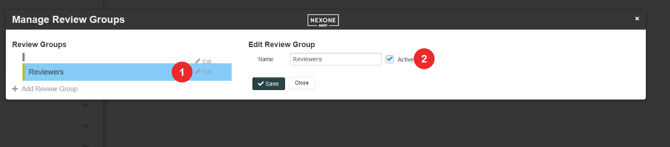
  9. Click on Edit then uncheck Active to deactivate the group
     8923a241-3e8d-45ab-b7ed-c949a369cb2e