
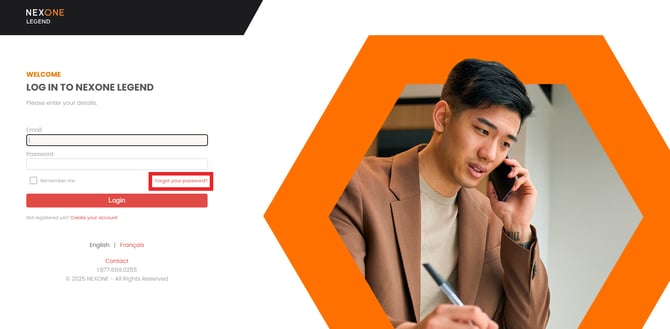
1. Click on "Forgot your password?"
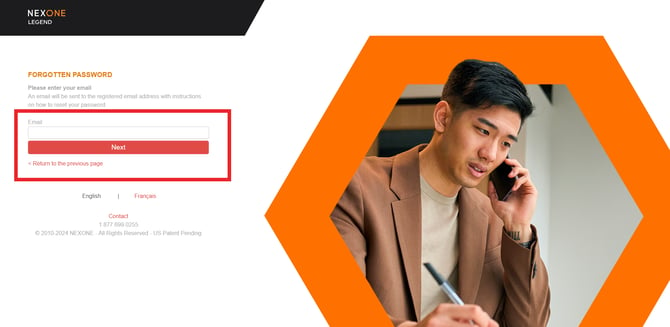
2. Enter your email address + Next
3. Enter your Security Question and Answer, then click "Reset"
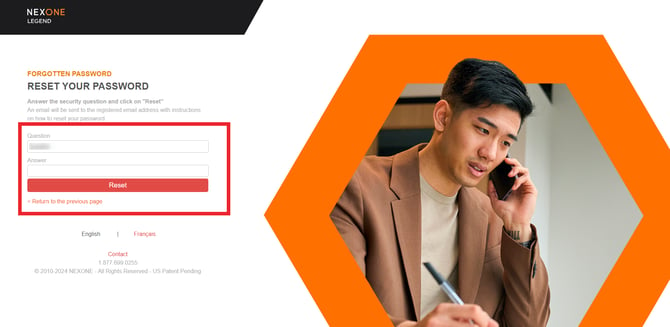
An email will be sent to the registered email address with instructions on how to reset your password.
Resetting your NexOne password
- Request a Password Reset:
Contact NexOne Support at support@nexone.ca to request a password reset. You'll have 48 hours to change your password once you receive the reset email. - Reset Your Password:
- Open the password reset email.
- Follow the instructions provided to update your login credentials.
- Copy and paste the new login details into the appropriate fields.
- Update Your Profile Password:
- Log in to your NexOne account.
- Navigate to Profile > Password.
- Enter your current password and create a new one.
- Set Your Security Question:
- Go to the Security Question section in your profile.
- Complete the fields and select Change to save your security question.